![GovernmentFrameworks_Logo_Full Colour (3).png]](https://support.governmentframeworks.com/hs-fs/hubfs/GovernmentFrameworks_Logo_Full%20Colour%20(3).png?height=40&name=GovernmentFrameworks_Logo_Full%20Colour%20(3).png)
If there are any unfamiliar terms within this article, please consult our glossary.
An audit report and a metadata report serve two distinct functions.
An audit report is centered around tracking and analyzing user actions and events within the repository.
Metadata reports focus on organizing and detailing the information associated with documents and folders to enhance management and searchability.
Audit Reports
- Provide a customizable list of events that have been audited within the Laserfiche repository.
- They focus on tracking user actions and events, such as document creation, deletion, and modification.
Use Case
- Typically utilized by administrators for compliance and monitoring purposes.
- Ensures proper usage of the repository and adherence to organizational policies.
Metadata Reports
- Emphasize details associated with documents and folders, such as user-created fields, tags, and document properties.
- These reports help in organizing, searching and managing documents.
This type of report lets you view and organize the metadata attributes related to documents, improving searchability and workflow efficiency. You can also generate reports based on those specific metadata fields.
Use Case
Those who need to manage document attributes and improve workflow processes, allowing them to categorize and find documents more easily within the repository.
Running Reports
Audit Reports can be found by either:
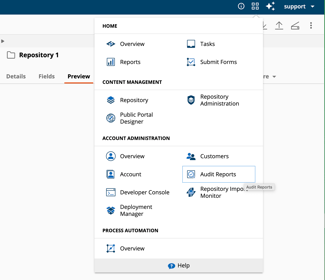
1. Navigating to the App Picker > Content Management > Audit Reports > New Report.
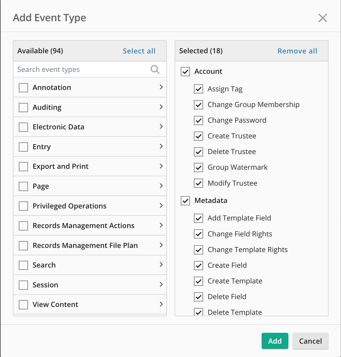
You can filter your report by:
- Saved Report
- Date Range
- User
- Entry ID
- Event Types
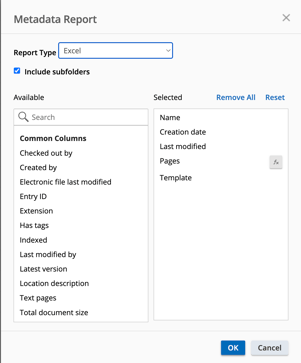
Metadata Reports can be found by:
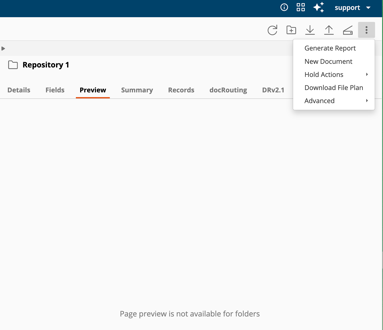
- Navigating to your repository, and then selecting the More Actions icon > Generate Report > Metadata Report.
- You can choose the type of report including Table, List, Excel or Test.
- Filters are extensive, and you may include as many as needed.
Should you have any further questions, or this article does not complete your help request, please log in to the GFW client support area and lodge a support ticket using this link.

This article was written by Matthew Clooney.
Click here to learn more about our authors.