![GovernmentFrameworks_Logo_Full Colour (3).png]](https://support.governmentframeworks.com/hs-fs/hubfs/GovernmentFrameworks_Logo_Full%20Colour%20(3).png?height=40&name=GovernmentFrameworks_Logo_Full%20Colour%20(3).png)
If there are any unfamiliar terms within this article, please consult our glossary.
Whether you are brand new to Laserfiche or a seasoned pro, there is nothing more frustrating than being unable to locate a document or file in your repository.
Using the Preview tab, the Summary tab and Context Hits can really help you narrow down your search, and find exactly what you are looking for without even having to open the document to view its contents.
The Preview Tab
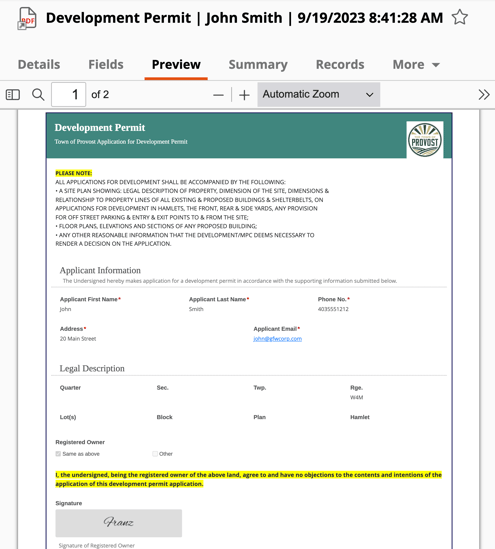
The Preview tab in the Details pane of Laserfiche allows you to view the contents of documents that have pages, including PDFs.
You can see a preview of the document's pages, including any annotations that may be present on those pages. This helps you quickly identify documents without needing to fully open them.
The Summary Tab
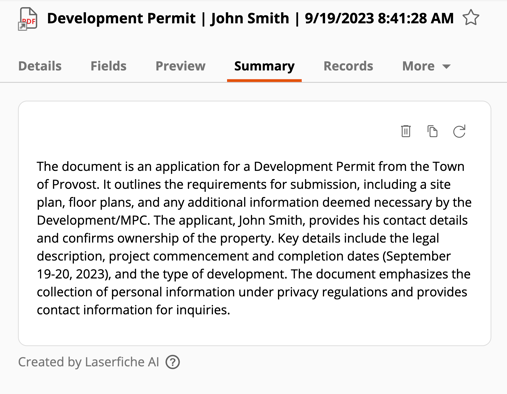
The Summary tab is also found in the Details pane of Laserfiche, and lets you create and manage document summaries. This helps your search by providing a quick overview of the document, prior to opening it.
The Summary Tab and Access Rights
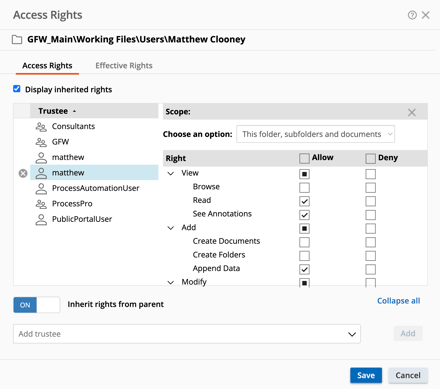
The ability to view, create or delete a summary is based entirely on your access rights within Laserfiche.
To create or manage summaries, you must have these specific access rights:
-
Create a Summary: Requires the Append Data entry access right.
-
View a Summary: Requires Read and See Through Redactions entry access rights.
-
Re-create a Summary: Requires Modify Contents entry access right.
-
Delete a Summary: Requires Delete Document Pages entry access right.
Context Hits
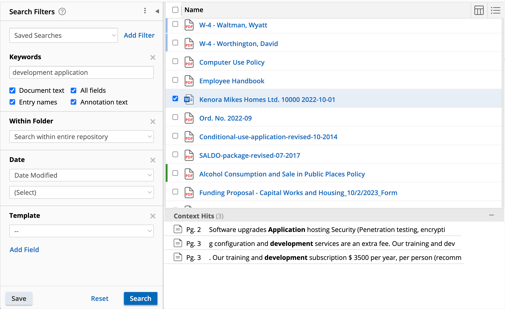
When searching for a document, context hits are displayed at the bottom of the search results. You can click on these context hits to open the document directly to the specific page or section where the search term was found, facilitating efficient navigation.
Context hits can enhance the searching experience by allowing quicker identification of relevant documents. They are particularly useful when searching through large amounts of data, as they summarize key information related to the search term.
By leveraging the Preview tab, Summary tab and Context hits, you can cut your search time down, locate the document, and view key information without needing to open the file, making your search experience significantly faster and more streamlined.
Should you have any further questions, or this article does not complete your help request, please log in to the GFW client support area and lodge a support ticket using this link.

This article was written by Matthew Clooney.
Click here to learn more about our authors.