![GovernmentFrameworks_Logo_Full Colour (3).png]](https://support.governmentframeworks.com/hs-fs/hubfs/GovernmentFrameworks_Logo_Full%20Colour%20(3).png?height=40&name=GovernmentFrameworks_Logo_Full%20Colour%20(3).png)
If there are any unfamiliar terms within this article, please consult our glossary.
Overview
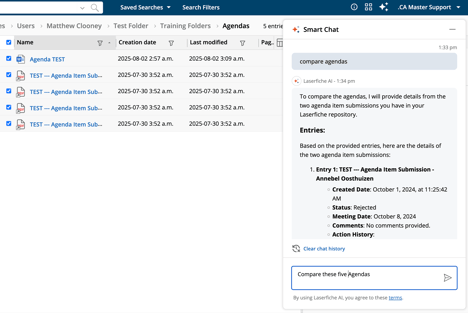
Smart Chat is an AI-powered chatbot built right into your Laserfiche repository.
It is designed to help users find exactly what they are looking for by searching, comparing, and extracting key information pertaining to the files and documents within the repository.
It allows users to ask natural-language questions, making it easier to discover relevant information quickly.

Key Features
- Multiple Access Points: Smart Chat is accessible from various locations within Laserfiche, including:
- Natural Language Processing: Users can type in questions in natural language, and Smart Chat will generate answers based on the content of the selected documents or general Laserfiche information. When querying multiple documents, users can select up to 100 documents for Smart Chat to reference.
- Contextual Responses: Smart Chat takes into account various document attributes, such as document text, tags, entry ID, creation date, and more, to provide accurate answers.
- Memory of Previous Questions: Smart Chat remembers prior questions during a session, allowing for a more conversational experience. Users can clear the chat history whenever they choose.
- Assistance with Product Questions: In addition to document-related queries, Smart Chat can assist users with questions about using Laserfiche itself, such as setup instructions for specific features.
Accessing Smart Chat
To launch Smart Chat, users can click the Laserfiche AI button in the header of the Document Viewer or other supported pages. The chat interface will appear, allowing users to input their questions.
Benefits to using Smart Chat
- Efficiency: Smart Chat significantly reduces the time spent searching for information within documents, enabling users to focus on higher-value tasks.
- User-Friendly: The natural language interface makes it accessible for users who may not be familiar with specific search syntax or document structures.
Should you have any further questions, or this article does not complete your help request, please log in to the GFW client support area and lodge a support ticket using this link.

This article was written by Matthew Clooney.
Click here to learn more about our authors.